Linking Your Account/Game Data Transfer
●Linking Your "Fate/Grand Order" Account
-
As of 2026-09-01 , you can link your "Fate/Grand Order" account with an Aniplex Online account.
If you link your accounts, you can perform data transfer for "Fate/Grand Order" without having to issue a Transfer Number in-game.
●Contact Us
- Inquiries about game data transfer:
Please contact the “Fate/Grand Order” Customer Support
- Inquiries about your Aniplex Online account:
For inquiries about your Aniplex Online account, use our inquiry form to contact Aniplex Online customer support.
●How to Link Your Account
* Follow these instructions within the "Fate/Grand Order" app.1. Open the "Account Linking" menu in "My Room".
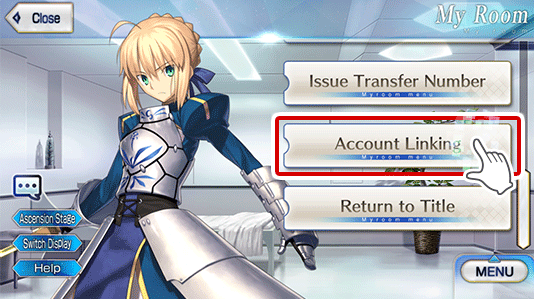
1. Open the "Account Linking" menu in "My Room".

2. Tap "Link Aniplex Online Account".
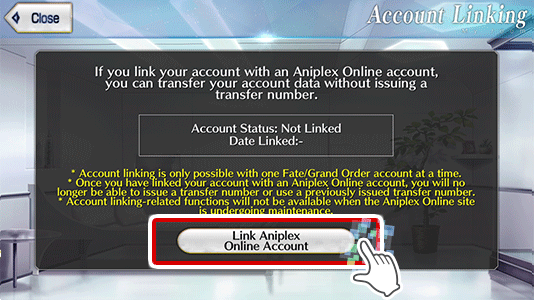
2. Tap "Link Aniplex Online Account".
3. Log in to Aniplex Online.
* If you already have an Aniplex Online account:
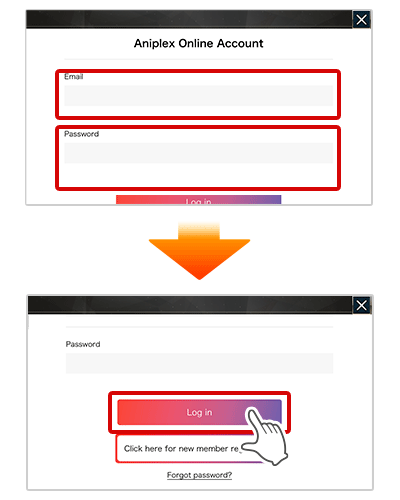
3. Log in to Aniplex Online.
* If you already have an Aniplex Online account:
- - Enter the email address and password you registered with Aniplex Online, then scroll to the bottom of the screen and tap "Log In".
3. Log in to Aniplex Online.
* If you do not yet have an Aniplex Online account:
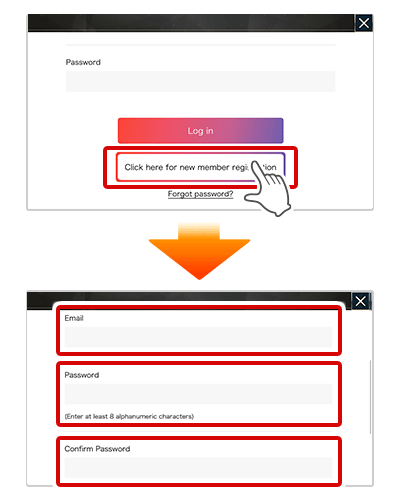
3. Log in to Aniplex Online.
* If you do not yet have an Aniplex Online account:
- - Scroll to the bottom of the screen and tap "New User Registration".
- - Next, enter your email address and the password you want to use at Aniplex Online, then scroll to the bottom of the screen and tap "Create Account".
- * If your email is not entered correctly, you may not be able to transfer game data. Make sure the address you entered was correct.
- * Please read the Term Of Use and Privacy Policy before creating an account. By tapping the "Create Account" button, you indicate that you have agreed to theTerm Of Use and Privacy Policy.
4. Your account is now linked.
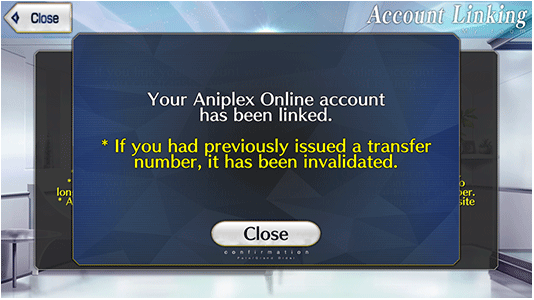
4. Your account is now linked.
- Once you finish these steps, a screen indicating that your account has been linked will be displayed.
- * While you have an Aniplex Online account linked, you will not be able to issue a Transfer Number within "Fate/Grand Order" as data transfer to another device can be performed without one.
- * If you wish to transfer your game data by issuing a Transfer Number in-game, please open the "Account Linking" menu in "My Room" and follow instructions on the screen to unlink your account.
●How to Transfer Game Data After Linking Your Account
* Follow these instructions within the "Fate/Grand Order" app.1. Tap the "Data Transfer" button on the title screen.
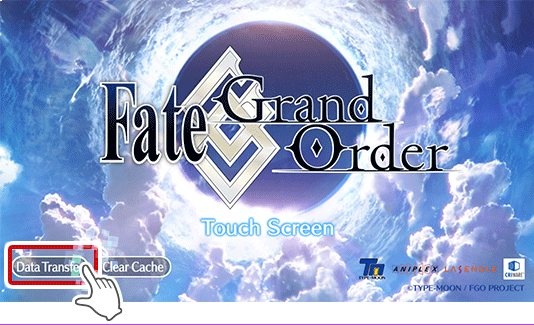
1. Tap the "Data Transfer" button on the title screen.
2. Tap "Use an Aniplex Online account".
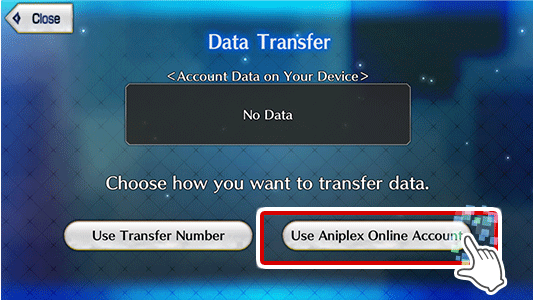
2. Tap "Use an Aniplex Online account".
- * If there is already game data on your device, it will be displayed in the center of the screen.
3. Log in to Aniplex Online.
* If there is not game data on your device:
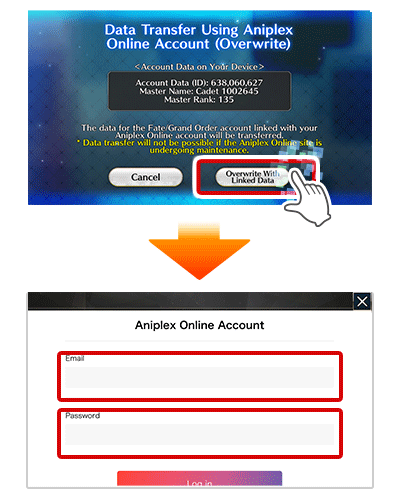
3. Log in to Aniplex Online.
* If there is not game data on your device:
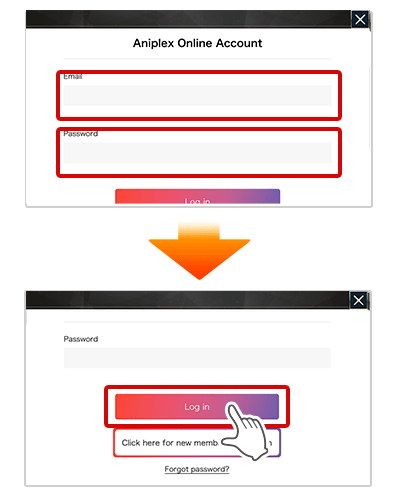
- - Enter the email address and password you registered with Aniplex Online, then scroll to the bottom of the screen and tap "Log In".
3. Log in to Aniplex Online.
* If there is game data on your device:
3. Log in to Aniplex Online.
* If there is game data on your device:
- - Tap "Overwrite Linked Data," enter the email address and password you registered with Aniplex Online, then scroll to the bottom of the screen and tap "Log In".
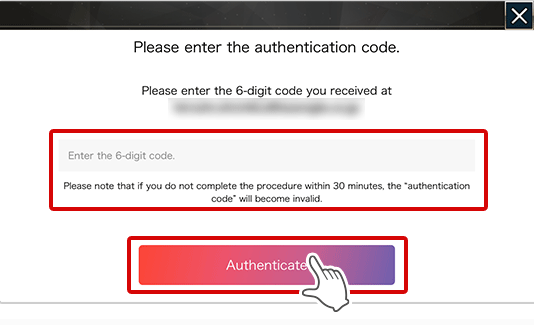
4. Enter your authentication code.
4. Enter your authentication code.
- - A six-digit authentication code will be sent to the email address you registered with Aniplex Online. Enter it when prompted on the screen.
- * If you do not receive an email with a authentication code, first make sure that the email is not in your spam folder and that the email address you registered is correct, then repeat from "Log in to Aniplex Online" above.
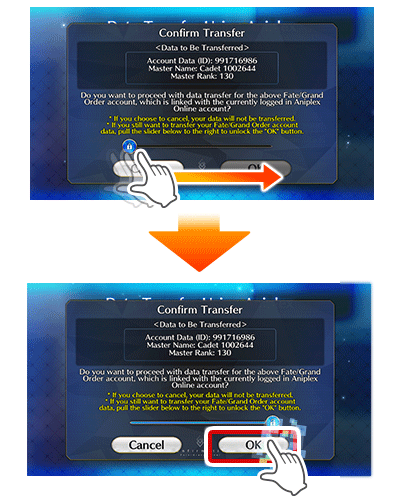
5. Swipe right to unlock, then tap "OK".
5. Swipe right to unlock, then tap "OK".
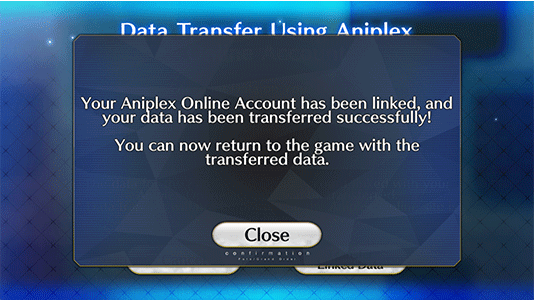
6. Game data transfer will be completed.
6. Game data transfer will be completed.